
| 일 | 월 | 화 | 수 | 목 | 금 | 토 |
|---|---|---|---|---|---|---|
| 1 | 2 | 3 | 4 | |||
| 5 | 6 | 7 | 8 | 9 | 10 | 11 |
| 12 | 13 | 14 | 15 | 16 | 17 | 18 |
| 19 | 20 | 21 | 22 | 23 | 24 | 25 |
| 26 | 27 | 28 | 29 | 30 |
- sql #부트캠프 #내일배움캠프 #웹관리자 #도전 #학습
- java #문법
- html #css #부트스트랩 #웹사이트 #개발 #초보 #til #내일배움캠프 #스파르타코딩클럽
- java
- sql #내일배움캠프 #스파르타코딩클럽
- Today
- Total
Hyeok의 웹 개발 블로그
<2025.04.21> [Spring - advanced] 코드 개선 & 트러블 슈팅 본문
✅ 코드 개선
- Early Return
String encodedPassword = passwordEncoder.encode(signupRequest.getPassword());

UserRole userRole = UserRole.of(signupRequest.getUserRole());

 if (userRepository.existsByEmail(signupRequest.getEmail())) {
            throw new InvalidRequestException("이미 존재하는 이메일입니다.");
이렇게 되어있던 코드를 리팩토링을 통해 passwordEncoder의 encode() 동작이 불필요하게 일어나지 않게 수정했다.
if (userRepository.existsByEmail(signupRequest.getEmail())) {
    throw new InvalidRequestException("이미 존재하는 이메일입니다.");
}

String encodedPassword = passwordEncoder.encode(signupRequest.getPassword());

UserRole userRole = UserRole.of(signupRequest.getUserRole());
✅ 불필요한 if- else 제거
WeatherDto[] weatherArray = responseEntity.getBody();
if (!HttpStatus.OK.equals(responseEntity.getStatusCode())) {
    throw new ServerException("날씨 데이터를 가져오는데 실패했습니다. 상태 코드: " + responseEntity.getStatusCode());
} else
	if (weatherArray == null || weatherArray.length == 0) {
        throw new ServerException("날씨 데이터가 없습니다.");
    }
코드에서 불필요하게 if -else 되어있어서 가독성이 떨어지고 깔끔하지 않습니다. 그래서 if - else 를 제거하고
여러개의 if 문으로 나열했습니다.
WeatherDto[] weatherArray = responseEntity.getBody();
if (!HttpStatus.OK.equals(responseEntity.getStatusCode())) {
    throw new ServerException("날씨 데이터를 가져오는데 실패했습니다. 상태 코드: " + responseEntity.getStatusCode());
}
if (weatherArray == null || weatherArray.length == 0) {
        throw new ServerException("날씨 데이터가 없습니다.");
    }
✅ Validation
if (userChangePasswordRequest.getNewPassword().length() < 8 ||
        !userChangePasswordRequest.getNewPassword().matches(".*\\d.*") ||
        !userChangePasswordRequest.getNewPassword().matches(".*[A-Z].*")) {
    throw new InvalidRequestException("새 비밀번호는 8자 이상이어야 하고, 숫자와 대문자를 포함해야 합니다.");
}
public class UserChangePasswordRequest {
@NotBlank(message = "기존 비밀번호를 입력하세요.")
private String oldPassword;
@NotBlank(message = "새 비밀번호를 입력하세요.")
@Size(min = 8, message = "새 비밀번호는 8자 이상이어야 합니다.")
@Pattern(regexp = ".*\\d.*",message = "비밀번호에 숫자가 포함되어야 합니다.")
@Pattern(regexp = ".*[A-Z].*", message = "비밀번호에 대문자가 포함되어야 합니다.")
private String newPassword;
}
- 첫 번째 코드를 해당 API의 요청 DTO 에서 처리하기 위해 RequestDto의 코드를 위와 같이 수정을 했습니다.
✅ N+1 문제 개선
@Query("SELECT t FROM Todo t LEFT JOIN FETCH t.user u ORDER BY t.modifiedAt DESC")
Page<Todo> findAllByOrderByModifiedAtDesc(Pageable pageable);
- fetch join 대신 @EntityGraph 사용해서 N+1 해결
@EntityGraph(attributePaths = {"user"})
Page<Todo> findAllByOrderByModifiedAtDesc(Pageable pageable);
✅ TestCode -1
@Test
    void matches_메서드가_정상적으로_동작한다() {
        // given
        String rawPassword = "testPassword";
        String encodedPassword = passwordEncoder.encode(rawPassword);

        // when
        boolean matches = passwordEncoder.matches(encodedPassword, rawPassword);

        // then
        assertTrue(matches);
    }
}
When 부분에 rawPassword 와 encodedPassword 의 순서를 바꿔 테스트가 의도대로 작동 하도록 수정하였다.
 @Test
    void matches_메서드가_정상적으로_동작한다() {
        // given
        String rawPassword = "testPassword";
        String encodedPassword = passwordEncoder.encode(rawPassword);

        // when
        boolean matches = passwordEncoder.matches(rawPassword, encodedPassword);

        // then
        assertTrue(matches);
    }
}
아래의 코드가 config 패키지에 있는 PasswordEncoder 클래스이다.
@Component
public class PasswordEncoder {

    public String encode(String rawPassword) {
        return BCrypt.withDefaults().hashToString(BCrypt.MIN_COST, rawPassword.toCharArray());
    }

    public boolean matches(String rawPassword, String encodedPassword) {
        BCrypt.Result result = BCrypt.verifyer().verify(rawPassword.toCharArray(), encodedPassword);
        return result.verified;
    }
}
✅ TestCode -2

위와 같은 코드를 아래와 같이 수정하여 TestCode가 정상 작동 되게 했습니다.
@Test
public void manager_목록_조회_시_Todo가_없다면_InvalidRequestException_을_던진다() {
    // given
    long todoId = 1L;
    given(todoRepository.findById(todoId)).willReturn(Optional.empty());

    // when & then
    InvalidRequestException exception = assertThrows(InvalidRequestException.class, () -> managerService.getManagers(todoId));
    assertEquals("Todo not found", exception.getMessage());
}
✅ TestCode -3
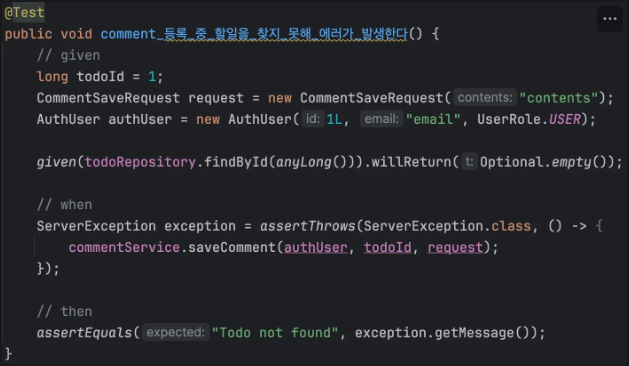
위 코드를 정상 작동 하게 하기위해 CommentService 클래스에 saveComment 매서드를 확인했습니다.
@Transactional
public CommentSaveResponse saveComment(AuthUser authUser, long todoId, CommentSaveRequest commentSaveRequest) {
    User user = User.fromAuthUser(authUser);
    Todo todo = todoRepository.findById(todoId).orElseThrow(() ->
            new InvalidRequestException("Todo not found"));

    Comment newComment = new Comment(
            commentSaveRequest.getContents(),
            user,
            todo
    );
1. ServerException 대신 InvalidRequestException을 사용하고 있기 때문에 TestCode에도 같이 맞춰줍니다.
2. findById (anyLong) 부분을 맞춰주기위해 findById(todoId) 로 수정해 줍니다.
@Test
public void comment_등록_중_할일을_찾지_못해_에러가_발생한다() {
    // given
    long todoId = 1;
    CommentSaveRequest request = new CommentSaveRequest("contents");
    AuthUser authUser = new AuthUser(1L, "email", UserRole.USER);

    given(todoRepository.findById(todoId)).willReturn(Optional.empty());

    // when
    InvalidRequestException exception = assertThrows(InvalidRequestException.class, () -> {
        commentService.saveComment(authUser, todoId, request);
    });

    // then
    assertEquals("Todo not found", exception.getMessage());
}
✅ TestCode - 4

위 코드를 성공 시키기 위해 서비스 로직을 수정했습니다.
@Transactional
public ManagerSaveResponse saveManager(AuthUser authUser, long todoId, ManagerSaveRequest managerSaveRequest) {
    // 일정을 만든 유저
    User user = User.fromAuthUser(authUser);
    Todo todo = todoRepository.findById(todoId)
            .orElseThrow(() -> new InvalidRequestException("Todo not found"));

    if (!ObjectUtils.nullSafeEquals(user.getId(), todo.getUser().getId())) {
        throw new InvalidRequestException("담당자를 등록하려고 하는 유저가 일정을 만든 유저가 유효하지 않습니다.");
    }
기존 ManagerService에 작성 되어있던 코드입니다.
@Transactional
public ManagerSaveResponse saveManager(AuthUser authUser, long todoId, ManagerSaveRequest managerSaveRequest) {
    // 일정을 만든 유저
    User user = User.fromAuthUser(authUser);
    Todo todo = todoRepository.findById(todoId)
            .orElseThrow(() -> new InvalidRequestException("Todo not found"));
    /**
     * todo.getUser() == null 코드 추가
     */
    if (todo.getUser() == null || !ObjectUtils.nullSafeEquals(user.getId(), todo.getUser().getId())) {
        throw new InvalidRequestException("담당자를 등록하려고 하는 유저가 일정을 만든 유저가 유효하지 않습니다.");
    }
- todo.getUser() == null || 코드를 추가하여 TestCode가 정상 작동하게 수정하였습니다.
✅ 트러블슈팅
- TestCode를 수정하고 실행하였을 때, 실행이 안되는 오류가 발생하였습니다. 그래서 원인을 알아보니, 설정을 안한 것이 문제 였습니다.
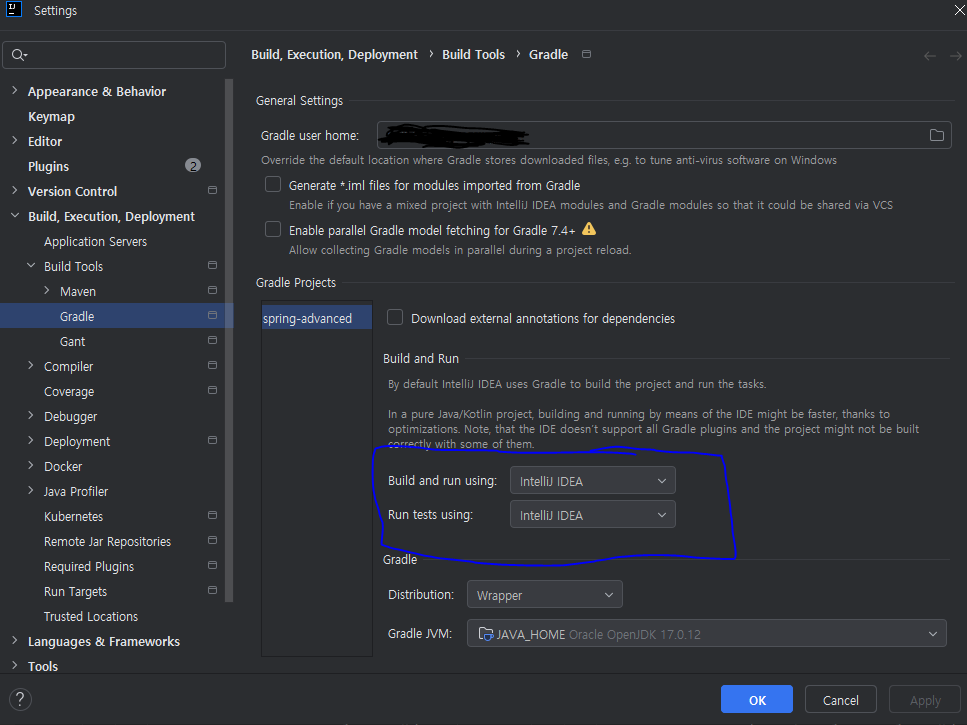
설정 에서 Build -> Build Tools -> Gradle 에 들어가서 그림에 파란 박스 안에 설정을 intellij IDEA로 변경해주었습니다.
위 설정을 해도 gradle-wrapper.properties 가 없어서 실행이 안되는 오류가 발생해서 파일을 생성해주었습니다.
distributionBase=GRADLE_USER_HOME
distributionPath=wrapper/dists
distributionUrl=https\://services.gradle.org/distributions/gradle-8.5-bin.zip
zipStoreBase=GRADLE_USER_HOME
zipStorePath=wrapper/dists
이렇게 설정을 하고 난 후에는 TestCode가 정상적으로 작동하는 것을 확인했습니다.
* 전체 코드 : https://github.com/yunhyeok-Lee/spring-advanced.git
'TIL > Spring' 카테고리의 다른 글
| <2025.05.01> 영속성 컨텍스트 (2) | 2025.05.01 |
|---|---|
| <2025.04.22> 배달 기능 프로젝트 피드백 (1) | 2025.04.22 |
| <2025.04.17> Formatter (0) | 2025.04.17 |
| <2025.04.15> HttpMessageConverter (2) | 2025.04.15 |
| <2025.03.31> IOC / DI (0) | 2025.03.31 |

